Staff training record for schools
Every member of staff's training, in one place
The record most schools keep in a spreadsheet, in one place: who holds what, with the certificate attached and the expiry date tracked, a reminder before anything expires, and a summary for governors of what was attended, what it cost and what impact it had. Built with a serving headteacher, for the way a school records training.
- The usual types of training set up for you, with how long each is valid for
- Certificates attached to the record
- Included in every subscription
- Data held in the UK
How the training record works
One file per member of staff
Every course and briefing against their name, with the certificate attached, the date, the provider and the expiry date. New starters come from the Team page; when someone leaves, their records stay on their page.
Coverage at a glance
For each type of training: who is current, due soon, expired or missing, and whether the school holds enough (two paediatric first aiders, say). The types of training every school needs are set up for you, with how long each is valid for.
Reminders before expiry
A short email when a certificate is within 30 days of its expiry date, so the renewal is booked before it lapses. Renewing is one button: the new record replaces the old one, when you say so.
Group courses recorded once
One course, several members of staff, one invoice: one entry, a record for each person, and the cost shared between them. Add someone who was missed and the cost is shared out again.
Certificates attached
Upload the certificate to the record and it is there when someone asks, downloadable per course. Downloadable per course when someone asks for it, instead of a folder in the office that one person knows their way around.
Staff see their own file
A member of staff with a login sees their own training on their dashboard, what is in date, due soon, expired or missing, and rates a course they attended: how useful it was and what impact it will have, with the impact for the school and for them in their own words.
The summary governors ask for
The Summary tab answers the governors' questions before they are asked: what the year's training cost, who paid, which School Development Plan priorities it served, and what the staff who attended made of each course. As a PDF with no names on it, ready for the meeting.
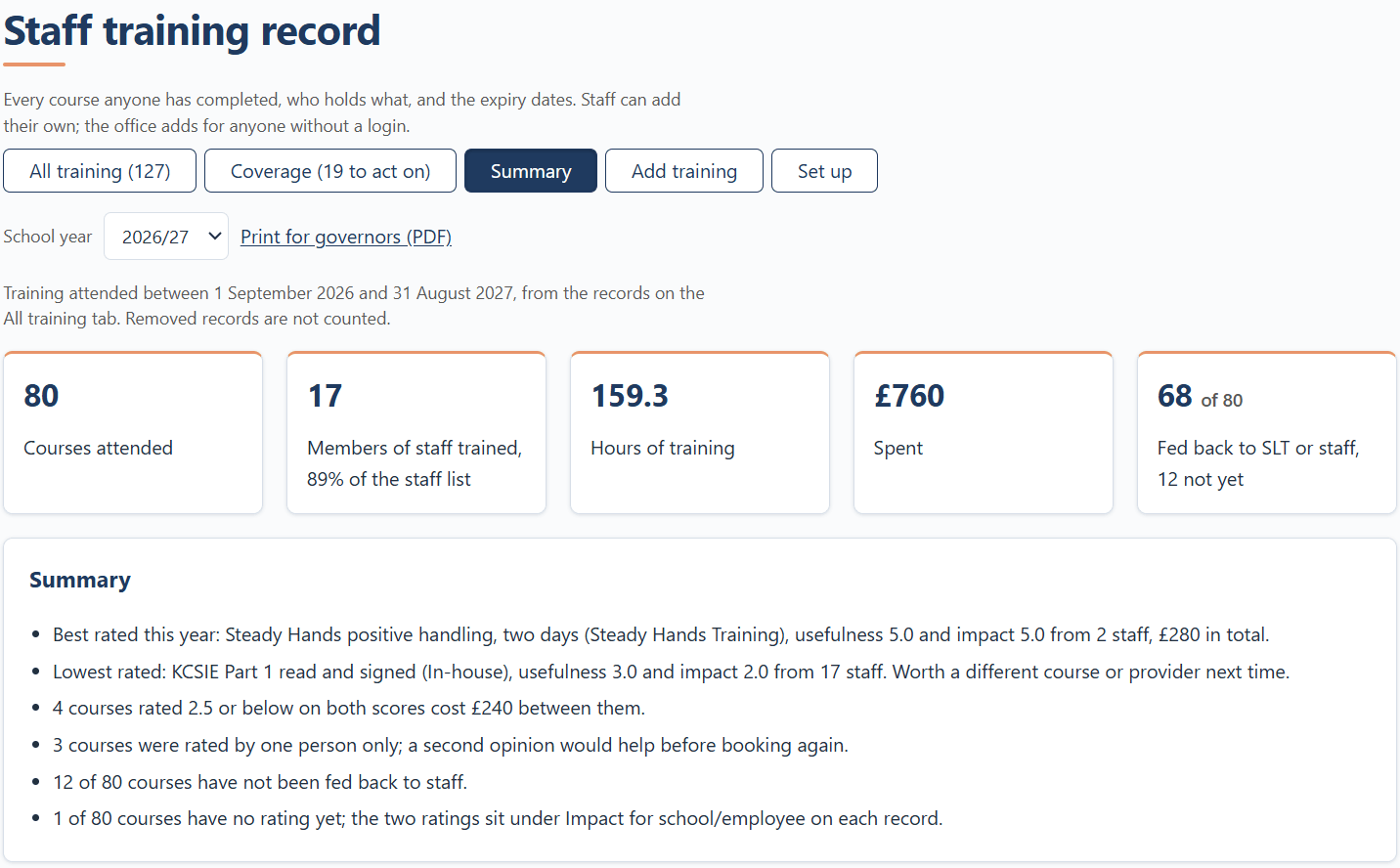
The year at a glance
Courses attended, members of staff trained as a share of the staff list, hours, spend and how much has been fed back to the senior leadership team or to staff. Beneath the tiles, a few plain sentences the record has worked out for you: the best and lowest rated courses, the spend behind the top priority, what needs renewing by the end of next term.
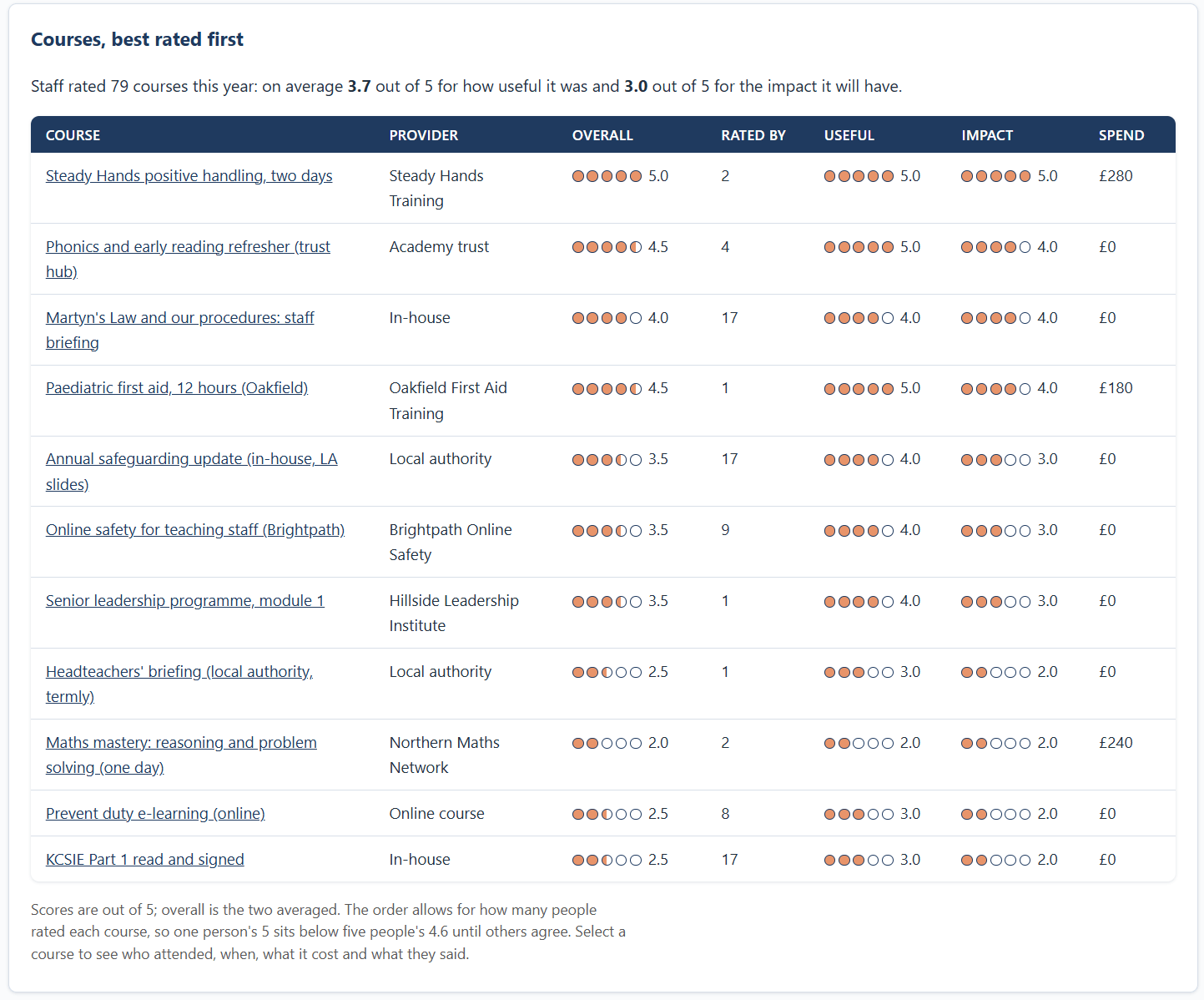
Courses, best rated first
Every course anyone attended this year, rated by the people who went: how useful it was and what impact it will have, out of 5, with the provider and the spend beside it. The order allows for how many people rated each course, so one person's 5 sits below five people's 4.6. Select a course to see who attended, when, what it cost and what they said. So the next booking is made knowing what the last one was worth.
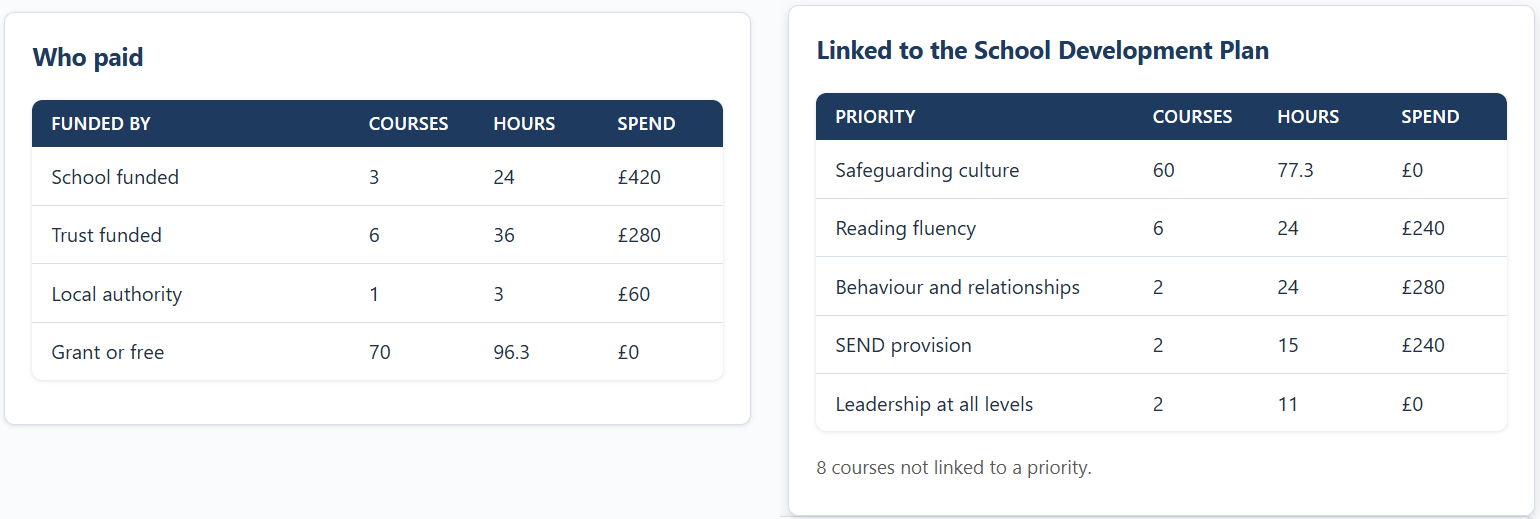
Who paid, and where it went
Spend by who funded it (the school budget, pupil premium, the trust or local authority, a grant) and spend against each School Development Plan priority for the year. The courses nobody linked to a priority show up as a line of their own, which is often the first question a governor asks.
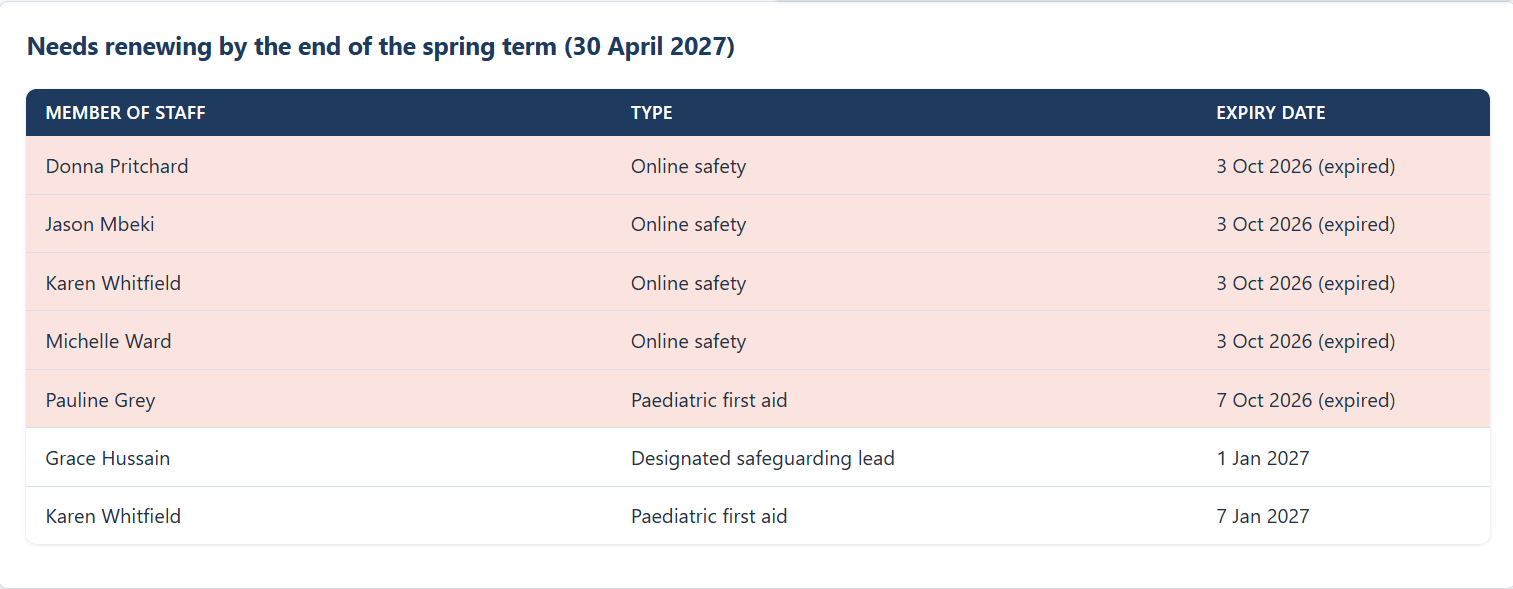
What needs renewing by the end of next term
The same tab ends with the certificates that expire before the end of next term, expired ones first, so the renewals can be booked in one go rather than one email at a time. The governors' PDF carries the same list by type, with no names on it.
Setting up the training record
-
Check the types of training
Under Set up, the usual types of training are already there: safeguarding, designated safeguarding lead, Prevent, first aid, fire warden and more, each with how long it is valid for. Add your own, mark what everyone must hold, and how many holders the school needs.
-
Add your staff
The record reads the Team page, the one list of people at the school. A login is optional: office, kitchen and lunchtime staff can be on the record without one.
-
Record what they hold
Enter each record: the course, the date, the provider and the certificate, from the certificates in the office or your current spreadsheet. The expiry date is worked out from how long the type of training is valid for; change it to match the certificate.
-
Keep it up to date
Reminders arrive before anything expires, new courses are recorded as they happen, and the Summary tab is ready for the governors' meeting.
The record you may be asked for
Who is trained in what, and when it expires, is one of the first things asked for at an inspection, by the local authority and by your own governors. A spreadsheet answers it on a good day. A record with the certificate attached, the expiry date tracked and the renewal recorded answers it every day, and a governors' summary with no names on it shows the spend was worth it.
Visitor and staff sign-in, the other record every school keeps
What the training record costs
Nothing beyond your subscription. The staff training record is included for every school, with the Martyn's Law tools and visitor sign-in, from £295 a year plus VAT at the founding price. No per-user fees, no add-ons. Every school starts with a free 30-day trial, with no card details.
Questions schools ask
Does the training record remind us before a certificate expires?
Yes. The school's account owners get a short email when a certificate is within 30 days of its expiry date, and the Coverage tab shows who is current, due soon, expired or missing for each type.
Can staff see their own training record?
A member of staff with a login sees their own training file on their dashboard: what is in date, due soon, expired or missing, and they can rate a course they attended. Staff without a login are on the record too; the office keeps it for them.
What does the staff training record cost?
Nothing beyond the SchoolProof subscription. It is included for every school, with the Martyn's Law tools and visitor sign-in, and every school starts with a free 30-day trial.
One record for the whole school
Pick your school from the register and the training record is ready for your staff's records. 30 days free, no card details.
Start your free 30-day trialSchoolProof supports your compliance work; responsibility for compliance remains with your school's responsible person. Guidance, not legal advice.